---
title: "Connecting ATCOM+ to Facility Heat Trace Infrastructure: LTE Router"
description: Network Architecture, System Requirements and Security Overview
---
[Skip to content](https://app.atcom.plus/knowledge/router-atcom-setup#main-content)
English
Show submenu for translations
[](https://app.atcom.plus/knowledge?hsLang=en)
Open main navigation
Close main navigation
- English
Show submenu for translations
Everything ATCOM+ And Heat Trace Related.
- There are no suggestions because the search field is empty.
1. [Everything ATCOM+ and Heat Trace Related](https://app.atcom.plus/knowledge?hsLang=en)
2. [Everything ATCOM+](https://app.atcom.plus/knowledge/everything-atcom?hsLang=en)
# Connecting ATCOM+ to Facility Heat Trace Infrastructure: LTE Router
## Network Architecture, System Requirements and Security Overview
### **Background:**
ATCOM+, a cloud-based heat trace monitoring and management application, offers seamless access to critical heat trace systems from any location with internet connectivity. As a cloud-based platform, ATCOM+ ensures users have access to the latest updates and features while maintaining robust security measures to protect sensitive data.
For remote or smaller heat trace installations with less than 100 EHT circuits and a reliable cellular signal, leveraging an LTE router to connect to ATCOM+ offers a simplified network architecture.
### Purpose:
This article is intended to explore the implementation of ATCOM+ using an LTE router for facility heat trace infrastructure, catering to remote or smaller installations. Focusing on simplicity and reliability, we delve into the network architecture and security considerations associated with this approach. By highlighting the benefits and requirements of leveraging an LTE router, we aim to guide facilities in effectively utilizing ATCOM+ for cloud-connected heat trace monitoring and management, even in remote or network-constrained environments.
### Overview:
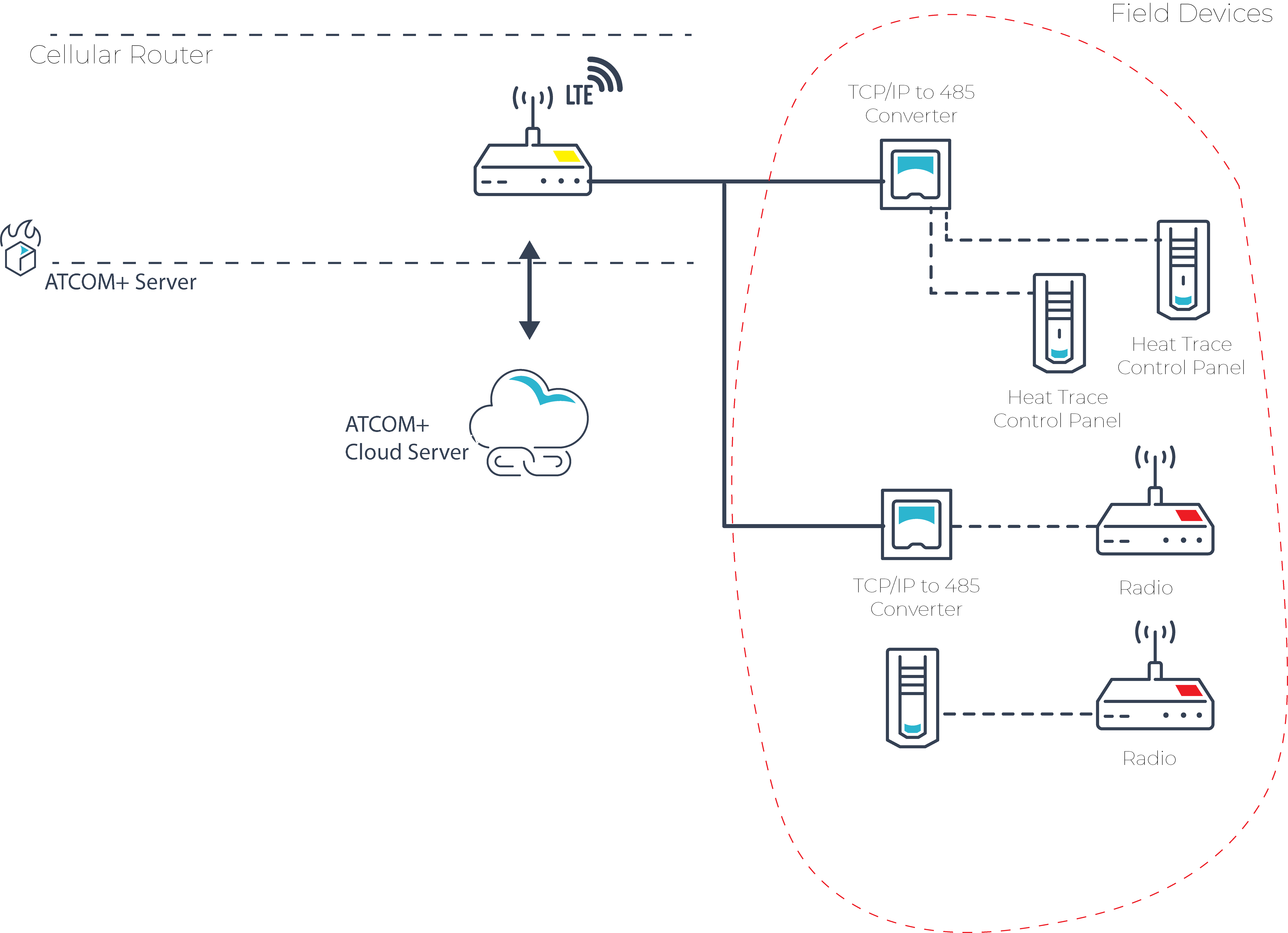
In this approach, field devices are connected directly to the cloud via the LTE router, eliminating the need for additional VMs or equipment management.
### Security:
An encrypted VPN tunnel is established to the ATCOM+ Cloud, allowing direct Modbus polling. This ensures that field devices are only accessible through the encrypted VPN tunnel, providing network isolation and enhanced security.
### Requirements:
- LTE Router, such as the InHand IR302 LTE CAT4
- Cellular Data Plan, with a recommended allocation of 1GB of data per 100 circuits per month.
- [What is ATCOM+?](https://app.atcom.plus/knowledge/what-is-atcom?hsLang=en)
- [Everything ATCOM+](https://app.atcom.plus/knowledge/everything-atcom?hsLang=en)
- [Everything Heat Trace Communication](https://app.atcom.plus/knowledge/everything-heat-trace-communication?hsLang=en)
- [Heat Trace Testing & Troubleshooting](https://app.atcom.plus/knowledge/heat-trace-testing-troubleshooting?hsLang=en)
- [Heat Trace Installation](https://app.atcom.plus/knowledge/heat-trace-installation?hsLang=en)
- [Heat Trace Controllers](https://app.atcom.plus/knowledge/heat-trace-controllers?hsLang=en#main-content)
- [Thermon Controllers](https://app.atcom.plus/knowledge/heat-trace-controllers?hsLang=en#thermon-controllers)
- [nVent Controllers](https://app.atcom.plus/knowledge/heat-trace-controllers?hsLang=en#nvent-controllers)
- [Thermon Genesis Controllers](https://app.atcom.plus/knowledge/heat-trace-controllers?hsLang=en#thermon-genesis-controllers)
[](http://atcom.plus)
© 2024 Diamond Thermal Systems.