---
title: Auto Cycle - Thermon TCM18 TC1818 Heat Trace Controllers
description: Mastering Auto Cycle Procedures for Thermon TCM18 & TC1818 Heat Trace Controllers
---
[Skip to content](https://app.atcom.plus/knowledge/auto-cycle-thermon-tcm18#main-content)
English
Show submenu for translations
[](https://app.atcom.plus/knowledge?hsLang=en)
Open main navigation
Close main navigation
- English
Show submenu for translations
Everything ATCOM+ And Heat Trace Related.
- There are no suggestions because the search field is empty.
1. [Everything ATCOM+ and Heat Trace Related](https://app.atcom.plus/knowledge?hsLang=en)
2. [Heat Trace Controllers](https://app.atcom.plus/knowledge/heat-trace-controllers?hsLang=en)
3. [Thermon Controllers](https://app.atcom.plus/knowledge/heat-trace-controllers?hsLang=en#thermon-controllers)
# Auto Cycle - Thermon TCM18 TC1818 Heat Trace Controllers
## Mastering Auto Cycle Procedures for Thermon TCM18 & TC1818 Heat Trace Controllers
### Introduction
Welcome to our comprehensive knowledge base article on mastering auto cycle procedures for Thermon TCM18 and TC1818 heat trace controllers. These controllers are indispensable components within industrial heat tracing systems, serving as the backbone for ensuring optimal performance and efficiency. Understanding how to execute an auto cycle is paramount for maintaining peak functionality and swiftly addressing any potential issues that may arise.
In this article, we'll provide detailed, step-by-step instructions and expert insights to guide you through the process of performing an auto cycle for Thermon TCM18 and TC1818 controllers. Whether you're a seasoned technician looking to refine your maintenance protocols or a newcomer eager to expand your expertise, this guide is your ultimate resource for mastering this essential task.
### Resources:
[TraceNet-TCM18-Operating-Manual](https://hubs.ly/Q02sK83K0)
### Legend:
[Auto Cycle Step-by-Step for TCM18](https://app.atcom.plus/knowledge/auto-cycle-thermon-tcm18#TCM18)
[Auto Cycle Step-by-Step for TCM1818](https://app.atcom.plus/knowledge/auto-cycle-thermon-tcm18#TCM1818)
---
### Auto Cycle Step-by-Step for TCM18
Here's a step-by-step guide for auto cycling on Thermon TCM18 and TC1818 Heat Trace Controllers:
**1. Enter Program Mode:**
To program circuit control settings or control parameters, multiple keys in sequence
will need to be pressed. To change the settings associated with
Auto Cycle, first press the green PROG key.
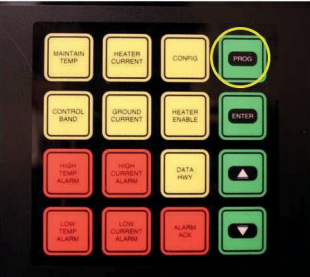
The Display now reads as shown :
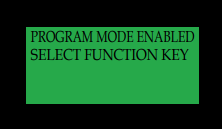
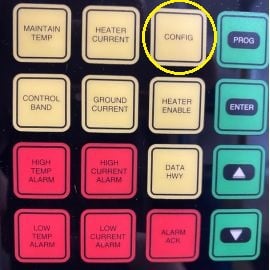
**2. Entering Config:**
To enter Configuration mode first press the yellow CONFIG key
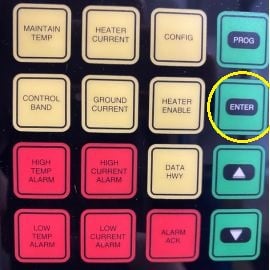
**3. Navigating to AUTO Self Test**
Now that you are in Config press ENTER to cycle through all the sections until you reach AUTO SELF TEST, This should be 5-6 sections down.
The Display now reads as shown :
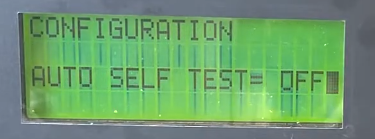
**4. Select AUTO Cycle Duration**
Use the arrows keys to increase/decrease the Auto Cycle time to desired value.
**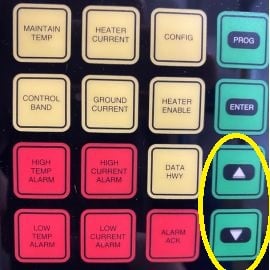**
**5. Saving and Returning to Home Screen**
When completed with this or any programming activity, press the green PROG key to exit and
return to SCAN MODE. However, if for some reason this is not done, the screen
will automatically return to SCAN mode operation after a short pause.
****
---
### Auto Cycle for TCM1818
Here's a step-by-step guide for auto cycling on Thermon TC1818 Heat Trace Controllers:
**1. Enter Program Mode:**
To program circuit control settings or control parameters, multiple keys in sequence
will need to be pressed. To change the settings associated with
Auto Cycle, first press the green PROG key.

The Display now reads as shown :

**2. Entering Config:**
To enter Configuration mode first press the yellow CONFIG key

**3. Navigating to AUTO Self Test**
Now that you are in Config press ENTER to cycle through all the sections until you reach AUTO SELF TEST, This should be 5-6 sections down.

The Display now reads as shown :

**4. Select AUTO Cycle Duration**
Use the arrows keys to increase/decrease the Auto Cycle time to desired value.
****
**5. Saving and Returning to Home Screen**
Press ENTER to return to scan mode and save your auto cycle selection.

Following these steps will enable you to effectively set up auto cycling on Thermon TCM18 and TC1818 Heat Trace Controllers.
- [What is ATCOM+?](https://app.atcom.plus/knowledge/what-is-atcom?hsLang=en)
- [Everything ATCOM+](https://app.atcom.plus/knowledge/everything-atcom?hsLang=en)
- [Everything Heat Trace Communication](https://app.atcom.plus/knowledge/everything-heat-trace-communication?hsLang=en)
- [Heat Trace Testing & Troubleshooting](https://app.atcom.plus/knowledge/heat-trace-testing-troubleshooting?hsLang=en)
- [Heat Trace Installation](https://app.atcom.plus/knowledge/heat-trace-installation?hsLang=en)
- [Heat Trace Controllers](https://app.atcom.plus/knowledge/heat-trace-controllers?hsLang=en#main-content)
- [Thermon Controllers](https://app.atcom.plus/knowledge/heat-trace-controllers?hsLang=en#thermon-controllers)
- [nVent Controllers](https://app.atcom.plus/knowledge/heat-trace-controllers?hsLang=en#nvent-controllers)
- [Thermon Genesis Controllers](https://app.atcom.plus/knowledge/heat-trace-controllers?hsLang=en#thermon-genesis-controllers)
[](http://atcom.plus)
© 2024 Diamond Thermal Systems.